PNG or JPG: Which Format to Pick and Why (Full Comparison)
Photos often suit JPG; logos, screenshots, and transparency often suit PNG. Learn why results depend on image content and when to compare another format.
PNG or JPG? It depends on what the image is for. One is not “better” — they solve different problems, and picking the wrong one means your file is either too large or missing something it needs.
Why PNG files are usually larger than JPG
PNG encoding is lossless: it can reproduce the pixels supplied to the encoder exactly, as defined by the W3C PNG specification. That does not restore detail already discarded by a lossy source, and PicShift preserves decoded pixels only when PNG quality is 95–100; lower values may quantize the palette.
JPG is lossy — it drops information according to an encoder quality setting. A photographic PNG can become much smaller as JPG, but the amount saved and the visible change depend on the source and settings.
The gap is often larger for photographs. For screenshots with flat colors and sharp text, PNG can be competitive or smaller. There is no fixed ratio that applies to every image.
Short version: photographs often produce smaller JPG files. Screenshots, icons, and graphics with sharp edges are usually better candidates for PNG, but compare the actual output.
When to convert PNG to JPG
Usually because the PNG is too large.
This happens constantly: someone takes a screenshot or exports from a design tool and gets a file that exceeds an upload limit. Converting photographic content to JPG at quality 80–85 is a reasonable starting test, not a guarantee of a particular size or invisible loss.
Cases where PNG → JPG makes sense:
- Upload forms with a size limit. CMS editors, social platforms, and web forms often cap file size. JPG gets you under the limit fast.
- Email attachments. Large PNGs slow down delivery and annoy people. JPG is lighter for photos in email.
- Web pages where transparency is irrelevant. A product photo on a white background does not need PNG. A smaller JPG may reduce transfer time.
- Batch processing. Preparing many photographic PNGs for an e-commerce site? Converting a representative sample to JPG lets you measure the size and visual trade-off before processing the batch.
PicShift’s PNG to JPG converter runs this locally in your browser — nothing gets uploaded.
When to convert JPG to PNG
JPG → PNG is not about saving space. It is about protecting quality for editing.
Every time you decode, edit, and re-encode a JPG, another lossy generation can change pixel values. Converting to PNG at PicShift quality 95–100 preserves the decoded pixels for subsequent lossless PNG saves; it cannot recover detail the JPG already lost. Lower PNG quality values may quantize the palette.
Reasons to go JPG → PNG:
- Repeated editing. If the image will be opened, modified, and saved multiple times, PNG is the safer working format.
- Transparency. JPG cannot do transparent backgrounds. Need to cut out an object? PNG (or WebP).
- Archiving. For images that must stay pixel-perfect, PNG is more stable long-term.
One thing to be clear about: converting JPG to PNG does not magically restore quality already lost during JPG compression. It just prevents more loss from that point forward.
Convert JPG to PNG in your browser with PicShift.
When neither PNG nor JPG is the best choice
Both formats are from the 1990s. Modern alternatives beat them in specific situations.
WebP supports lossy and lossless compression plus transparency. It can be smaller than JPG for some sources and settings, but the result is not a fixed percentage. If images are going on a website, convert JPG to WebP, compare the actual files, and verify support in the target environment.
AVIF may produce a smaller result for some images, but it can also cost more encoding time and target support varies. It is an option for sites that generate and compare outputs and provide a fallback.
Practical approach: WebP for web delivery, PNG for editing and transparency, JPG as the universal fallback when maximum compatibility matters.
If you are weighing format trade-offs across the full set, our format compatibility guide lays out which formats open where, including the pitfalls with HEIC, AVIF and older Office tools.
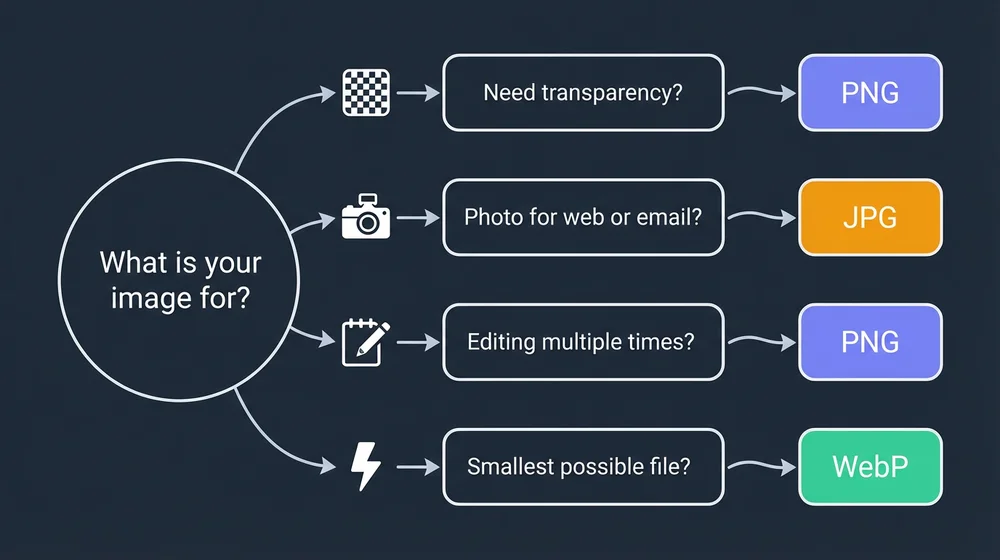
Quick decision guide
| Situation | Best format |
|---|---|
| Photo for a website | WebP (or JPG if WebP is not supported) |
| Screenshot or UI mockup | PNG |
| Image that needs transparency | PNG (or WebP) |
| Email attachment | JPG |
| Image for repeated editing | PNG |
| Product photo for e-commerce | WebP for the site, JPG as fallback |
| Archive or backup | PNG |
| Social media upload | JPG (platforms re-compress anyway) |
The simple rule
PNG and JPG are not competing. PNG wins when you need lossless quality, transparency, or editing stability. JPG wins when you need smaller files and broad compatibility. And for web delivery in 2026, WebP is increasingly the answer to both.
Pick the format that fits your actual workflow, not the one with the better spec sheet.
If you are tuning quality settings while you decide, our notes on image quality vs file size cover what really changes between quality 70 and 95 — and when re-saving an already-compressed image stops paying off, which we explain in why output size can increase.